Tuesday, October 18, 2011

MR 2012 Expected Release Date & Functionality

MR 2012 (previously referred to as MR2 FP2) is currently scheduled to be released in the late March/early April 2012 time frame. 

MR 2012's new functionality centers around the theme of 'distribution' and is expected to offer the following:
  • Microsoft Dynamics NAV integration
  • A richer report viewing experience, including:
    • Drill back to Dynamics ERP
    • Show accounts without dimension codes on reports
    • Comments
    • Instant Messenger integration
  • Report output flexibility, including:
    • Export to XPS
    • MS SharePoint integration with alerts (There is not expected to be an MR Viewer for MS SharePoint, but rather a listing of reports that will launch the MR Viewer and view the report from the secure MR Report Library.)
  • Report Scheduling (Note that command link scheduling is available now)
A listing of MR versions and release dates can be found here.

Friday, October 14, 2011

Prophix CPM

Prophix CPM is a fully integrated performance management solution that empowers organizations with budgeting, planning, forecasting, reporting, consolidations and personnel planning capabilities.  
 
Prophix CPM’s robust analysis functionality empowers end-user investigation with ad-hoc ‘drag and drop’ capabilities, automatic variance calculations and full drill-down to details on measures within the business model.

Prophix CPM has the ability to combine financial and operational business models, meaning that you can leverage Prophix to manage performance across your entire organization and roll these operation budgets into your financial model.  An example would be to create a project/job costing model that facilitates budgeting project costs at the operational level.  This model would then facilitate budget to actual reporting for projects and automatically update the financial budget/forecast when changes are made to any project’s budget/forecast.

Prophix CPM facilitates the automation and scheduling of administrative functions, from importing actual data to distributing Excel templates for end user contribution to distributing financial reports via email or Microsoft SharePoint.

Prophix CPM is ERP agnostic meaning that it can be used with any ERP system including any Microsoft Dynamics ERP.  It also fully integrates with TARGIT BI.

For more information contact me and/or view the Prophix CPM Product Tour.

Tuesday, October 4, 2011

MR Translations - FRx vs MR

Management Reporter's financial translations feature is completely different from FRx's functionality, which is a welcome improvement!

The highlights of FRx's functionality was that you had to:
  1. Re-enter your average, spot and historical rates in FRx's DAX tables (since it couldn't pull this information from your Dynamics ERP), and
  2. Have a number of settings correct in FRx (i.e. company currency, report catalogue translations feature, translations activated in the column and the column syntax correct). 
The beauty of the translations feature in MR is that it leverages the Dynamics ERP exchange rate information.  In Dynamics GP, it specifically references a default exchange table.  So, in most cases, a client can have two exchange tables (i.e. monthly average, and spot/historical) used for multiple purposes including: calculating exchange at time of transaction, revaluing foreign currency transactions and financial translations. Next, you have to set the translation setting for each account in your ERP.

Once this is complete, there is only one step to perform in Management Reporter to produce a translated financial statement, namely, ensure that you have a column with the Currency Source set to the translated currency.  In the sample below, the functional currency is USD and the translated currency is CAD:


MR Column Translating USD to CAD
This is what the final report looks like:


Sample MR Translated Report
I must say, this functionality is a great improvement and much more efficient than what was provided in FRx.  Enjoy!

Monday, September 5, 2011

Management Reporter Security & Licensing

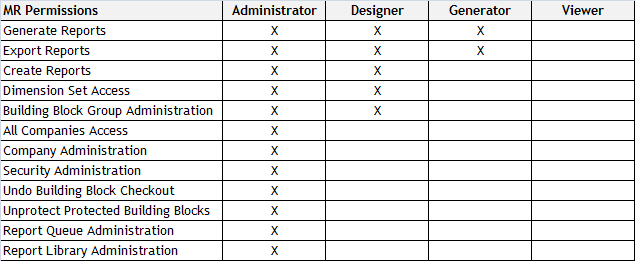
Management Reporter's security model allows for four pre-defined security roles, namely: Administrator, Designer, Generator & Viewer.  These roles roughly correspond to their FRx counterpart; however, note that much of the rest of the way security works is very different than FRx.  For example, you cannot secure a specific report or building block to a specific group or user.

The chart below gives an overview of the MR security roles:


Now, MR licensing adds another twist.  Full Microsoft Dynamics GP licenses entitle an organization to an MR Designer license. This license allows the MR user to be given Administrator/Designer rights, although these licenses could be assigned as Generator/Viewers.

The Light Office user entitles an organization to an MR Viewer license which allows MR users to be granted Generator/Viewer rights.

So, if you require additional MR users, please contact your Microsoft Partner to review your needs; however, the following options may be available:

- a full Microsoft Dynamics GP license, which would give you an additional MR Designer license
- a separate MR Designer license (this would not give you any other Microsoft Dynamics GP users)
- a Light Office user.

Tuesday, July 19, 2011

Management Reporter Version Numbers & Release Dates

I was so inspired by a recent posting on FRx version numbers and release dates by Noah Moseley and Penny Watts posted here, that I thought I'd share the same for MR:
  • MR2 RTM Release - 2.0.1662.37 (May 2010)
  • MR2 SP1 - 2.0.1663.3 (September 2010)
  • MR2 FP1 - 2.0.1664.19 (December 2010)
  • MR2 SP2 - 2.0.1700.31 (June 2011)
  • MR2012 (formerly known as MR2 FP2) - 2.1.1026.37 (March 2012)
  • MR2012 RU1 (Rollup 1) - 2.1.10.28.0 (Spring 2012)
  • MR2012 RU2 (Rollup 2) - 2.1.1029.30 (July 2012)
  • MR2012 RU2 Re-release - 2.1.2030.2 (September 2012)
  • MR2012 RU3 (Rollup 3) - 2.1.1031.40 (November 2012)
  • MR2012 RU4 (Rollup 4) - 2.1.1033.30 (January 2013)
  • MR2012 RU5 (Rollup 5) - 2.1.1037.12 (April 2013)
  • MR2012 RU5 (Rollup 5 with hot fix) - 2.1.1037.15 (May 2013)

Friday, June 10, 2011

Top 7 Reasons to Choose TARGIT Business Intelligence for Microsoft Dynamics ERP/CRM

The following Top 7 Reasons to choose TARGIT Business Intelligence for Microsoft Dynamics ERP/CRM were presented at BDO's annual user conference  on May 12, 2011:


1) Easy to Use
2) Highly Interactive
3) Enables ‘Power Users’
4) Unique CALM/OODA Philosophy
5) Consolidate Reporting across Multiple Data Sources
6) Enterprise Level Solution
7) Better Performance
 
The following are a few key aspects from what I presented.
 
My take on how BI has evolved and how the level of insight has increased over time
 
 
An introduction to the Performance Management Pyramid or my explanation of what it takes for an organization to successfully implement and utilize a CPM solution
 
 
An introduction to TARGIT's unique CALM or OODA philosophy, which is embedded into their entire solution
 
 
A sample TARGIT dashboard
 
 
Please contact me for more information on how TARGIT might revolutionize BI in your organization and/or visit http://www.targit.com/

Friday, June 3, 2011

Dilbert and Why to Not Budget using Excel

For many smaller organizations with simple budgeting/forecasting needs, Excel works just fine.  However, as Dilbert points out below, there are certainly drawbacks to using Excel:


For organizations with more complicating needs, the value of a using a dedicated CPM solution for budgeting/forecasting and financial/management reporting are myriad, including:
- Simplify and better control the budgeting process
- Reduced administration of the budgeting cycle
- Increased collaboration
- Real time version control
- Mitigate speadsheet ‘mis-calculations’ and ‘overrides’
- Better manage security
- Historical tracking/audit of changes
- Integrated financial/management reporting solution to facilitate variance reporting
- Simply reforecasting administration