Showing posts with label MR. Show all posts

Monday, December 2, 2013

Dynamics GP Reporting Options & Alternatives

One of the previous tag-lines for Microsoft Dynamics was 'it works the way you do' and when it comes to reporting, that pretty well sums up the Microsoft Dynamics GP offering in a nutshell.

There are a lot of options for reporting! 

Sometimes the options themselves can be confusing; however, remember that each reporting tool has its pros/cons and 'sweet spots' as my recent client exercise below shows:


In some cases, third-party reporting and/or planning tools such as those identified and circled make sense and drive the most value for an organization's needs.

If you 100% of your planning and reporting needs for Microsoft Dynamics ERP are not being met, tell me about it below and lets see how I can help.

Wednesday, December 5, 2012

When will Management Reporter do budgeting and forecasting?

This post is nothing but my own thoughts, as Microsoft unfortunately does not have an update on when Management Reporter will incorporate budgeting and forecasting functionality.

That being said, I wonder if the following two recent developments in MR 2012 RU3 might hint that budgeting is just around the corner:
  • Extension of the data mart for Dynamics GP
  • MR Web Report Viewer
What could these developments hint at you ask? 

Well, the data mart would be a good backbone for housing the budget and forecast version data in a uniform way across all Dynamics ERPs.  Since MR will eventually be the full Dynamcis ERP CPM solution, the budgets will not necessarily need to be brought back into the respective Dynamics ERP, unless other aspects of the ERP require it (i.e. encumbrance management).

To a lesser degree, a web-based interface simplifies access to Management Reporter and could be leveraged for future remote budget entry similar, but much better than, Forecaster's webclient.

Click here for more or my ramblings about budgeting in Management Reporter.

Thursday, August 23, 2012

Budgeting in Management Reporter

It has been over two years now since Management Reporter 2 was released and available for Microsoft Dynamics GP - its hard to believe!  Click here to see my first blog post on the subject.

Microsoft's original road map showed budgeting and forecasting built into Management Reporter in two stages:
  • Simple budgeting in 2012
  • Complex budgeting in 2014
Obviously a roadmap is highly subject to change and at this point in the game, Microsoft is still in the planning stages.  While this may cause uncertainty for users who are holding out for this functionality to be added to MR, lets hope that our wait is worth it in as far as the future functionality delivered in MR.

According to my Linked In poll here, the majority of MR users want to see budgeting as the next feature, followed up by integration with sub-ledgers rather than just the GL.

Since all the Dynamics ERP solutions have basic budgeting features, perhaps Microsoft's strategy has changed to hold-off and just deliver features that surpass Microsoft Forecaster rather than introduce basic budgeting and forecasting.

Either way, if you or your organization is looking for a unified CPM solution that handles all budgeting, forecasting, reporting and analysis in one place today, look no further than Prophix CPM.  Click here for more information on its advanced capabilities.  Your budget contributors, financial analysts and their spouses or significant others will thank you!

Tuesday, April 17, 2012

Management Reporter 2012 has been released!

Management Reporter 2012 has been released!  This release includes more than 30 new features, including all promised features!  You can find videos of these features at the Microsoft CPM blog here.

Some of the new features include:
  • Integration with Microsoft Dynamics NAV
  • Schedule reports to generate on a periodic basis
  • Publish reports to multiple Microsoft SharePoint or network locations
  • E-mail a link to the report from the Report Viewer
  • Quickly create a chart based upon selected report rows and columns
  • Drill from account and budget balances on a report to related information in your Microsoft Dynamics ERP
  • Toggle the accounts display to optionally include/not include the dimension descriptions by user
One important thing to mention is that the FRx migration tool currently does not work with MR 2012.  We expect this will be addressed shortly, but in the meantime, you will need to migrate on the previous version of MR.

Thursday, February 9, 2012

New Features in MR 2012!

Management Reporter (MR) 2012 is chaulk full of new features, many of which in line with the 'distribution theme' of this release.

Here is a partial listing:
  • MR 2012 now integrates with all Dynamics ERPs (i.e. NAV has been added)
  • Drill-back to Dynamics ERP
  • Comments
  • Multiple-destination distribution flexibility
  • SharePoint integration
  • Scheduling
  • Missing Account Analysis
What I find spectacular is that Microsoft has delivered on all the enhancements it promised last year that I blogged about here.

For more information, please visit the official Microsoft Dynamics CPM blog where they are show casing new features each week.  In many cases, MS has included a link to a YouTube MR 2012 demo! 

Saturday, November 12, 2011

Looking for an FRx, MR, or Forecaster alternative or replacement?

For the record, I am a huge supporter of Microsoft's CPM solutions, which currently include FRx, MR and Forecaster.  While these solutions generally serve most CPM needs, there are certain CPM requirements that cannot be addressed well by these solutions.

Prophix CPM is a scalable enterprise level CPM solution that can handle 7 of these more challenging requirements:
  1. Combine financial & operational models to link key business drivers to budgets & forecasts
  2. Facilitate complex planning and forecasting scenarios
  3. Improve reporting speed
  4. Facilitate a robust workflow to help manage the budgeting cycle
  5. Automate the dissemination of reports and budgeting templates
  6. Fully automate and schedule administrative functions (i.e. loading of data, etc)
  7. Reduce administration to facilitate more frequent forecasting and timely intervention
If you're looking for a replacement for any or all of these solutions, Prophix CPM should make the short-list. Contact me or view the autodemo for more information.

Tuesday, October 18, 2011

MR 2012 Expected Release Date & Functionality

MR 2012 (previously referred to as MR2 FP2) is currently scheduled to be released in the late March/early April 2012 time frame. 

MR 2012's new functionality centers around the theme of 'distribution' and is expected to offer the following:
  • Microsoft Dynamics NAV integration
  • A richer report viewing experience, including:
    • Drill back to Dynamics ERP
    • Show accounts without dimension codes on reports
    • Comments
    • Instant Messenger integration
  • Report output flexibility, including:
    • Export to XPS
    • MS SharePoint integration with alerts (There is not expected to be an MR Viewer for MS SharePoint, but rather a listing of reports that will launch the MR Viewer and view the report from the secure MR Report Library.)
  • Report Scheduling (Note that command link scheduling is available now)
A listing of MR versions and release dates can be found here.

Tuesday, October 4, 2011

MR Translations - FRx vs MR

Management Reporter's financial translations feature is completely different from FRx's functionality, which is a welcome improvement!

The highlights of FRx's functionality was that you had to:
  1. Re-enter your average, spot and historical rates in FRx's DAX tables (since it couldn't pull this information from your Dynamics ERP), and
  2. Have a number of settings correct in FRx (i.e. company currency, report catalogue translations feature, translations activated in the column and the column syntax correct). 
The beauty of the translations feature in MR is that it leverages the Dynamics ERP exchange rate information.  In Dynamics GP, it specifically references a default exchange table.  So, in most cases, a client can have two exchange tables (i.e. monthly average, and spot/historical) used for multiple purposes including: calculating exchange at time of transaction, revaluing foreign currency transactions and financial translations. Next, you have to set the translation setting for each account in your ERP.

Once this is complete, there is only one step to perform in Management Reporter to produce a translated financial statement, namely, ensure that you have a column with the Currency Source set to the translated currency.  In the sample below, the functional currency is USD and the translated currency is CAD:


MR Column Translating USD to CAD
This is what the final report looks like:


Sample MR Translated Report
I must say, this functionality is a great improvement and much more efficient than what was provided in FRx.  Enjoy!

Monday, September 5, 2011

Management Reporter Security & Licensing

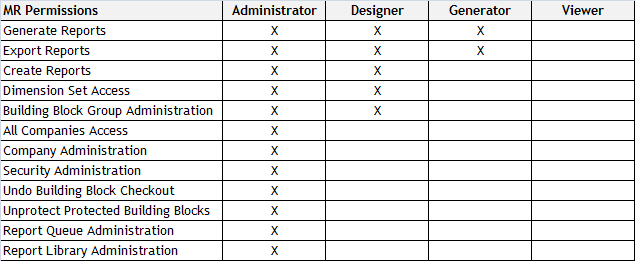
Management Reporter's security model allows for four pre-defined security roles, namely: Administrator, Designer, Generator & Viewer.  These roles roughly correspond to their FRx counterpart; however, note that much of the rest of the way security works is very different than FRx.  For example, you cannot secure a specific report or building block to a specific group or user.

The chart below gives an overview of the MR security roles:


Now, MR licensing adds another twist.  Full Microsoft Dynamics GP licenses entitle an organization to an MR Designer license. This license allows the MR user to be given Administrator/Designer rights, although these licenses could be assigned as Generator/Viewers.

The Light Office user entitles an organization to an MR Viewer license which allows MR users to be granted Generator/Viewer rights.

So, if you require additional MR users, please contact your Microsoft Partner to review your needs; however, the following options may be available:

- a full Microsoft Dynamics GP license, which would give you an additional MR Designer license
- a separate MR Designer license (this would not give you any other Microsoft Dynamics GP users)
- a Light Office user.

Tuesday, July 19, 2011

Management Reporter Version Numbers & Release Dates

I was so inspired by a recent posting on FRx version numbers and release dates by Noah Moseley and Penny Watts posted here, that I thought I'd share the same for MR:
  • MR2 RTM Release - 2.0.1662.37 (May 2010)
  • MR2 SP1 - 2.0.1663.3 (September 2010)
  • MR2 FP1 - 2.0.1664.19 (December 2010)
  • MR2 SP2 - 2.0.1700.31 (June 2011)
  • MR2012 (formerly known as MR2 FP2) - 2.1.1026.37 (March 2012)
  • MR2012 RU1 (Rollup 1) - 2.1.10.28.0 (Spring 2012)
  • MR2012 RU2 (Rollup 2) - 2.1.1029.30 (July 2012)
  • MR2012 RU2 Re-release - 2.1.2030.2 (September 2012)
  • MR2012 RU3 (Rollup 3) - 2.1.1031.40 (November 2012)
  • MR2012 RU4 (Rollup 4) - 2.1.1033.30 (January 2013)
  • MR2012 RU5 (Rollup 5) - 2.1.1037.12 (April 2013)
  • MR2012 RU5 (Rollup 5 with hot fix) - 2.1.1037.15 (May 2013)

Friday, June 3, 2011

Dilbert and Why to Not Budget using Excel

For many smaller organizations with simple budgeting/forecasting needs, Excel works just fine.  However, as Dilbert points out below, there are certainly drawbacks to using Excel:


For organizations with more complicating needs, the value of a using a dedicated CPM solution for budgeting/forecasting and financial/management reporting are myriad, including:
- Simplify and better control the budgeting process
- Reduced administration of the budgeting cycle
- Increased collaboration
- Real time version control
- Mitigate speadsheet ‘mis-calculations’ and ‘overrides’
- Better manage security
- Historical tracking/audit of changes
- Integrated financial/management reporting solution to facilitate variance reporting
- Simply reforecasting administration

Tuesday, May 31, 2011

How to change your password in Management Reporter

If you have used Management Reporter 2 since the RTM release you may be aware that it was not easy to change your password once saved in MR.  It actually required a registry hack!

Well, MR now lets you change your password within MR itself and save it as well!  This means that you can log on to MR directly to your default company without having to enter any passwords at all!

To change your password in MR:
  1. Select Company > Companies
  2. Select 'Credentials'
  3. Change your password
  4. Click the option to 'save' your password (Optional)
  5. Click 'OK'

Tuesday, April 12, 2011

How to Migrate from FRx to MR (Management Reporter)

The steps below are based on a combination of guidance provided by Microsoft, as well as, my own experience. 

An interesting statistic is that in a recent organizations migration from FRx to MR, 80% of the reports migrated properly with very little manual intervention.  A further 10% required moderate intervention and the last 10% required re-design due to the fact that row linking was used in FRx. 

Pre-Migration Clean Up in FRx
  • Backup your Sysdata folder
  • Backup your Specification Set(s)
  • Decide which FRx reports and associated building blocks you wish to migrate to MR
  • Prepare your FRx data for migration
    • Remove/rename any building blocks with 'spaces' at the beginning of its ID
    • Delete any unneeded reports and building blocks
    • Delete any companies not in use, including the sample companies 
    • Associate any building blocks not being used with a Report Catalogue (otherwise, it will not be migrated to MR)
    • Ensure that any rows currently used with a row linking design in FRx are attached to a Report Catalogue, as they may not convert properly based on my experience.  (Note: Any reports with Reporting Trees that are referencing multiple rows will not be migrated properly as row linking is not currently supported.  Having said that, it is possible to reference multiple dimensions using the row links in a single row format, but I have seen some issues with this design migrating properly.) 
    • Remove any .G32 files not required 
  • Compact the FRx database
  • Set each FRx company as default
  • Ensure all GP2010 companies have the same segment names.  This step is only required if you have a multi-company installation and you have the same or similar segments/dimensions in each company's chart of accounts.  FRx' segment approach did not look at the actual names of the segment (i.e. Account, Department) but rather its position/length.  MR does look at this information and a typo or segment identified as 'Segment 1' could botch your entire migration!
Run MR Migration Wizard
  • The documentation on this is readily available and quite good.
Review & Clean Up Reports in MR
 Remember, running the MR wizard is generally a one-time event, as each time you run it, it will remove all the MR building blocks.


Cautions:
  • Rather than muddying your production FRx environment, I would recommend a separate FRx installation, preferably pointing at your GP2010 data as this comes in handy for validating that reports are working properly.
  • Remember to review the current MR readme information for information on what does not migrate (i.e. security) as well as to understand the functionality differences between FRx/MR (i.e. row linking, account sets)
Good luck!

Wednesday, March 16, 2011

Management Reporter (MR) Feature Pack Update

Microsoft Management Reporter Feature Pack 2 can currently be expected in the latter half of 2011, which means it will be here in time for Christmas!

Many of the new features will be related to a distribution theme, such as:


• Sharepoint integration (Note: This likely will not be an MR Viewer experience within Sharepoint, but rather a listing of reports in Sharepoint that users can launch the MR Viewer on and view with the MR Reports Library where they are securely stored.)


• Emailing


• Scheduling (Note: Command link scheduling is available now.)


• Show accounts without dimension codes on reports (Note: Currently account segments also display the full dimension names, which many people have wanted changed.)


• Some type of Drill down to GP


Obviously the above is not a full list and it is subject to change.  Please contact your Microsoft Dynamics Partner for more information.


Friday, February 11, 2011

Forecaster 'Missing Link' Found!

With Microsoft's recent release of the Forecaster Data Transfer Tool, a 'missing link' in the Microsoft CPM solution has been delivered.  

This is excellent news and means that we no longer have to rely on a manual Excel based method to feed Forecaster data into Dynamics GP.  Instead, this process can now be automated. 

It also allows Management Reporter to report on Forecaster data via Dynamics GP versus directly as can be done in FRx.

Best of all, this tool is free! 

For more information, visit the Microsoft Dynamics CPM blog or CustomerSource.

Note: The tool is compliant with GP2010.

Tuesday, October 19, 2010

Management Reporter: 7 Reasons to Upgrade

This blog is the condensed material to be presented in a webinar tomorrow:
  • Familiar User Interface (MR is both like MS Office and FRx)
  • Simplified Reporting Tools (i.e. Undo, Associations, Hide/Unhide, Exporting/Importing Selected Building Blocks, etc..)
  • Powerful Analysis & Personalization Capabilities (Logos, Custom Page Numbering, Custom Page Breaks, Complex Filtering, etc...)
  • Superior Performance & Security (SQL based solution, Enhanced Security, Server-side processing, Supports 64 bit, Windows Authentication, etc...)
  • Migrating from FRx to MR is Easy! (Well.. for the most part!)
  • MR is the Future! (MS has made a significant investment in MR as the CPM platform for Dynamics GP)
  • You Want to! (MR is only compatible with GP2010 and higher.  FRx SP11 is also compatible with GP2010.)

Friday, September 3, 2010

Management Reporter Building Block Import Features: Never Lose Sleep Again!

Another really nice new feature in MR (vs FRx) is the ability to import specific building blocks versus the entire exported building block group backup file.

The screen shots below show that even while I am not importing the catalogue, I can still import one of the building blocks (i.e. the row) associated with it.

Catalogue Not Seleted


Row Definition Selected


This is a great convenience for heavy report designers who like to make a full backup of their building blocks by exporting them prior to an all day (or more likely all night) report design session!

It is also a great feature for consultants to make use of when creating a reporting package solution or to troubleshoot report design.

Sleep well!

Thursday, August 5, 2010

Management Reporter: The Devil is in the Details!

Jan Harrigan's post on transaction level drill-down in FRx (here) inspired me to draft this post on how to achieve transaction level drill-down in MR.

The basics and tips that Jan covered in her post apply to MR.  The main difference is found in the column design.  In MR, you do this by selecting ‘ATTR’ as the column type, then selecting an Attribute Category. The screen shot below shows what this looks like. As a reminder, you need to have a ‘Periodic’ vs ‘YTD’ FD column type in the column for the transaction level drill-down to work AND ensure that the Report itself is set to display Financial, Account & Transaction level information.


Finally, the full list of all 19 transaction level 'categories' currently available for display on drill-down in MR are:

Audit Trail Code
Batch ID
Currency ID

Distribution Reference
Exchange Rate
Journal Entry
Originating Audit Trail Code
Originating Document Number
Originating Master Record ID
Originating Master Record Name
Originating Transaction Type
Reference
Reporting Ledger
Series
Source Document
TAPL
TDESC
Transaction Date
Voided

Have fun exploring the transaction level details! 
 
Note: Drill-down to Dynamics GP is currently not available in MR, but is expected to be included in Feature Pack 2, which is anticipated to be released in the spring/summer of 2011.

Friday, July 23, 2010

Management Reporter: The MR Dimension

One of my favourite new features in Management Reporter is how it supports Financial Dimensions.  Actually, there are two 'dimensions' to what I appreciate:

1) In addition to building your MR account structure on simply your Dynamics GP Chart of Accounts and your Analytical Accounting dimensions (which you could do with FRx), you can also include the Account Category or any of the GL Account Maintenance user defined fields.


2) The flexibility of the Financial Dimensions leaves FRx's structured rules behind and simplifies the report design process.  An example is that you can code a particlar line in a row format to include a single segment from your Chart of Accounts, while another line in the same row may actually reference multiple segments.

Tuesday, July 13, 2010

Migrating to Management Reporter (MR) from FRx when Upgrading to GP2010

Most of FRx’s core functionality is already built into Management Reporter (MR), including multi-company consolidation, multi-currency and AA integration. As such, many organizations using FRx could migrate to MR today along with GP2010 upgrade. 

Note:  Organizations do not have to migrate to MR with a GP2010 upgrade; however, an upgrade to GP2010 is required to use MR.

Having said that, a review of FRx functionality currently being used to ensure there are no surprise functionality gaps that may pose an issue upon migration is a good idea!

While this information is constantly changing, a current snap-shot of functionality gaps is outlined below:


'Not Yet' in MR:

Feature Pack 1 (FP/SP1), which is scheduled for fall 2010, is expected to have the following functionality:


• Translations (based off GP translations enhancement which is not yet in GP2010)


• Forecaster integration that will be more advanced that FRx’s

Feature Pack 2 (FP/SP2) which has a 'distribution' theme, scheduled for spring/summer 2011, is expected to have the following functionality:


• Sharepoint integration


• Email


• Drill down to GP (inquiry screen and possibly SRS reports)

'Not Currently Planned' for MR:

I believe the only ‘real’ deal breaker here is ‘row linking’ which is used in a small percentage of advanced FRx design environments.  However, a few other items, such as 'report manager' and 'effective dates' are also currently not planned to be incorporated into MR.  That may be somewhat misleading though, as MR may incorporate different more advanced functionality that would handle the same type of situations and much more.

 
'Different' or 'Improved' in MR:


Many features in MR are improved or different.  A few of these items are listed below:


• Translations (SP1)


• Forecaster integration (SP1)


• No Webport – Report Library (Current) or Sharepoint (SP2)


This is not a complete list.  I hope to blog about these features in the future, so stay tuned!